
How to Do Prompt Research for AEO: 2 Methods Compared
Prompt research starts with picking the right prompts. We compare two ways to do it, whole prompts or a category plus criteria, so you can see which fits your business.


Every SEO team I know is being pushed to focus on AI search, meaning answers from ChatGPT and Gemini. Plenty of teams already see conversions coming from it. In fact, just look at this stat:
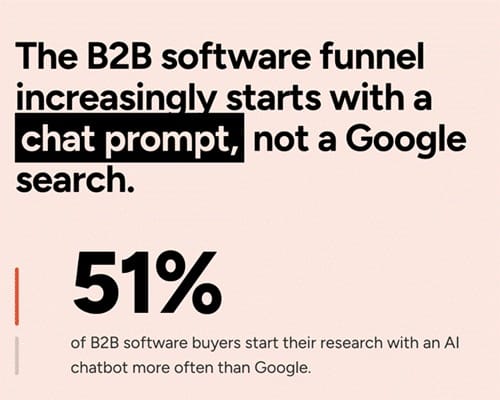
That's from G2's March 2026 survey of 1,076 B2B software buyers. , and my favorite part is that 69% of them picked a different vendor than planned because of what AI recommended.
That means if AI is helping build the shortlist, the questions buyers ask matter. As much as, the keywords they used to type into Google.
With SEO, Google Search Console and plenty of other tools told us what people searched, but with AI search, people type full questions, requirements, and deep inner thoughts into AI chat. We call these prompts.
Picking the right prompts is step one of AEO (also called GEO or AI SEO, yes, another acronym), because prompt tracking starts there. Pick the wrong ones, and everything after that measures the wrong thing.
How to do prompt research: two ways to pick prompts
Method 1 is a list of whole prompts, just like a keyword list, and it's familiar because most tools support it.
Method 2 splits each prompt into a category plus criteria, which feels unfamiliar but matches how buyers actually buy.
Today I'll compare them side by side using a CRM company as the example. At Chosenly we prefer Method 2, and I'll show you why along the way.
TLDR of the rest of the blog (you're welcome)
| Method 1: Whole prompts | Method 2: Category plus criteria | |
|---|---|---|
| How easy is it to get started? | Definitely easier, because you're used to the SEO process (see Method 1) | A bit more work at first, since you split each prompt into a category and criteria (see Method 2) |
| Can you track exactly what users search for? | In theory yes, but in practice it relies on your wording and the scale of it gets too large | It doesn't rely on you guessing every prompt, but instead breaks the prompt down to cover every variation |
| Can you reason why AI skips you? | No, only that you didn't show up in the answer | Yes, criterion by criterion |
| How much does it cost to track using this method? | Cost grows with every prompt | A few categories and criteria cover many prompts |
The rest of the blog walks through each row.
Want to see Method 2 run on your own prompts?
Get a Chosenly demo and watch your buyers' questions break down into categories and criteria.
Method 1: Pick a fixed list of whole prompts
You write a list of full prompts, and most teams make the list by taking queries from Semrush, Ahrefs or Google Search Console and rewording them as prompts. For a CRM company it could look like this, next to the keyword list an SEO team would build:
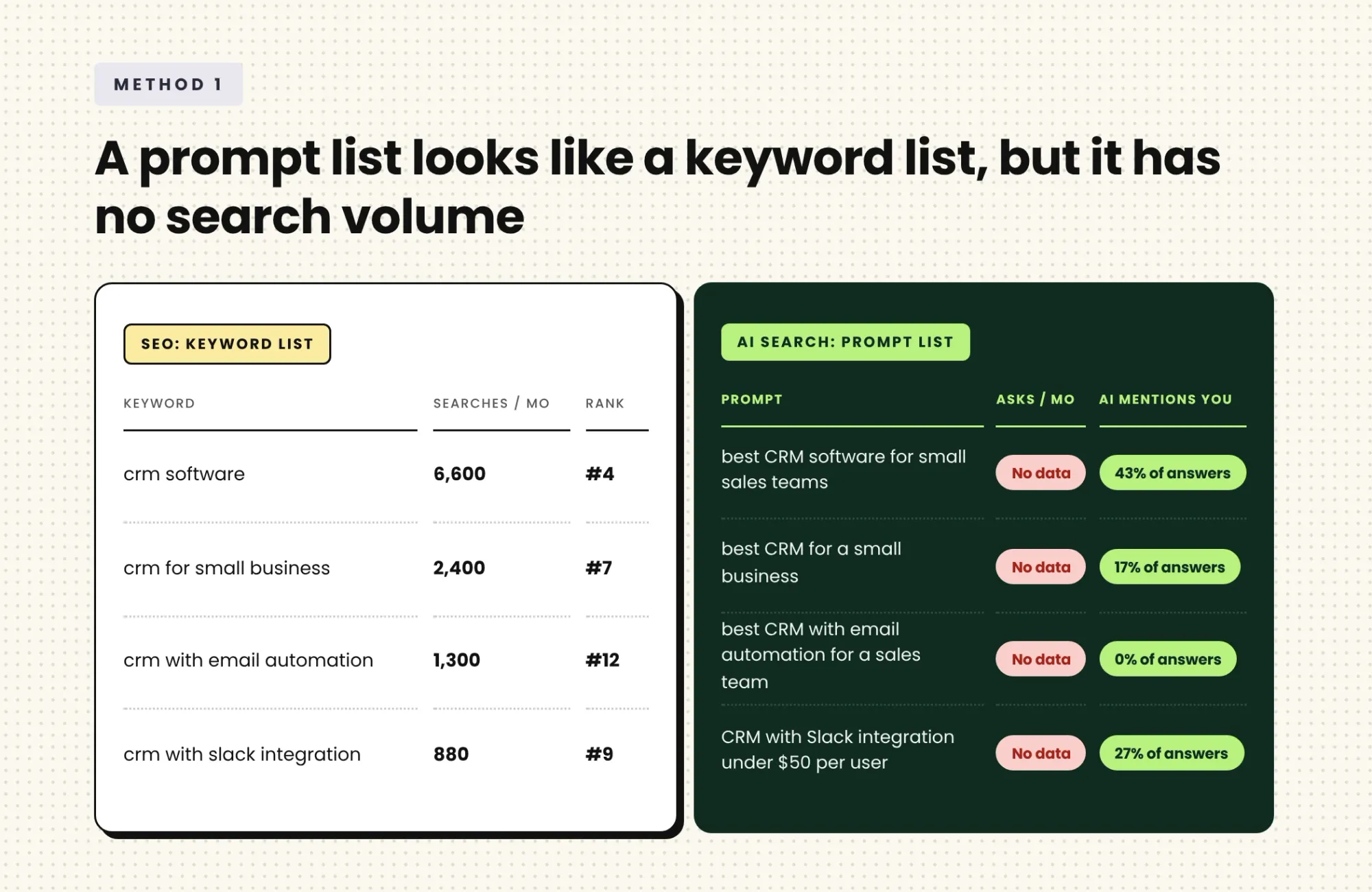
It's quick to set up, since you can build a list in an afternoon, and it works when your buyers make impulse purchases, so they ask short, simple questions you can list ahead of time.
There's one gap, though. A keyword list comes with search volume, while a prompt typed into ChatGPT has no volume data you can trust, and that is true for both methods. The bigger problem for Method 1 is the wording, because every prompt on your list is a reworded keyword, and nothing tells you whether buyers really ask it that way.
That's fine for a first look, but it gets risky when the list becomes the yardstick for your whole AI search program.
Method 2: Pick a category plus criteria
This is the one we recommend here at Chosenly, but it's different from what you're used to, so buckle up.
B2B buyers rarely stop at "best CRM" because they add context, so their prompts look like the four in the table below.
You can't guess every version of prompts like these, and even if you could, tracking all of them would waste money for very little gain, because most tracking tools price their plans by how many prompts you track.
So we split each prompt into two parts: the category, which is what the buyer is shopping for, and the criteria, which are the details they add. Here are those four prompts, split up:
| Buyer prompt | Category | Criteria |
|---|---|---|
| "We're a 20-person B2B team that lives in Slack and need a CRM with email automation that costs under $50 per user." | CRM software | Team of 20, Slack integration, email automation, under $50 per user |
| "What's the best sales CRM with a free trial for a startup?" | Sales CRM | Startup, free trial |
| "My CRM doesn't have an MCP. Which AI CRM has one and also integrates with Chosenly?" | AI CRM | MCP, Integration with Chosenly |
| "Recommend a HubSpot alternative that also has SOC 2 compliance. Its pricing should remain flat as the team scales, unlike HubSpot." | HubSpot alternatives | SOC 2, Flat pricing |
Why split them? Because buyers mix and match, so the same few parts (category and criteria) show up in lots of different prompts, as our earlier breakdown of how prompts vary showed.
Take a CRM company with the 4 categories and 10 criteria in the table above. By splitting prompts this way, you track only 14 parts, and you still have all the data you need to optimize for every prompt variation, without tracking each one.
With Method 1, you would need a line on your list for every variation, and the cost section below shows how fast that grows.
Where your categories and criteria come from?
You don't need a finished prompt list to start, because the raw material is already in tools your team uses. Here are three places to look:
- Sales call recordings: Buyers say what matters to them while they choose. The product they ask about is a category, and each question or requirement they raise is a criterion.
- Long Search Console queries: Queries of eight words or more read like prompts. The product in the query is the category, and each extra detail is a criterion.
- Competitor pages and review sites like G2: The features and comparisons buyers weigh there, such as pricing, integrations and support, show which criteria matter in your market.
Now that you know where categories and criteria come from, let's compare the two methods on three questions:
- Can you track what buyers really search for?
- Can you tell why AI skips you?
- What does it cost?
Criteria 1: Can you track exactly what users search for?
With Method 1, you choose the exact wording of every prompt, so the question is how close your wording gets to what buyers type. Buyers write full questions in their own words, so a list with one wording per need covers only a small slice of how they will ask for a CRM.
Buyers are also asking longer questions. Seer Interactive studied 387 real prompts and found that short keyword-style prompts fell from 18% to 3% in about a year, while prompts that hand the AI a whole task rose from 10% to 37%. It's a small sample, by Seer's own account, but it points the same way, so the prompts on your list can drift away from the prompts people really type.
Neither method can see every prompt buyers type, but Method 2 gets closer, because whether a buyer writes one short question or three paragraphs, it lands on a category and criteria you already track.
Criteria 2: Can you reason why AI skips you?
Say AI never recommends you for this prompt: "We're a 20-person B2B team that lives in Slack and need a CRM with email automation that costs under $50 per user." Method 1 can tell you that much, but it can't tell you why: maybe AI never found you, maybe it thinks you lack a Slack integration, or maybe it thinks you cost too much. Each reason needs a different fix, which means a different change to your website or content, and you're left guessing which one it is.
Method 2 scores each criterion on its own, so every question about "Slack integration" lands in one place, however the buyer worded it. That shows how often AI mentions you when Slack integration matters, which competitor it recommends instead, and which web page it used to decide.
If the gap is Slack, a page that clearly explains your Slack integration is a good place to start, and if it's price, AI needs a clear pricing page to pull your price from, so each criterion gets its own fix.
Criteria 3: How much does it cost to track using this method?
With the same 4 categories and 10 criteria, tracking every permutation and combination of a prompt with 1 category and any of the criteria would mean tracking thousands of prompts (4096 to be exact), which is obviously bonkers. Method 2 still needs only the 14 parts.
The gap widens as you grow. Add one more criterion, and Method 2 adds one part to track, while Method 1 adds a whole new set of prompts, one for every combination the new criterion joins.
Cost is also only half the problem. Even with an unlimited budget, tracking thousands of prompts would still be a waste of money, because that pile of data wouldn't point to one clear thing to fix next, while the 14 parts show you where to work.
Which way of picking prompts is right for you?
Pick Method 2 when your buyers research before they decide, as they do in B2B SaaS, services and education, because their prompts are long and different every time. Method 1 works when buyers make impulse purchases and ask short, simple questions, because then you really can list what they ask.
Ready to pick your prompts the Method 2 way?
See where AI skips you, and why
Book a quick call and we'll show you how AI answers your buyers' prompts, criterion by criterion.