
Best AirOps Alternative: Review, Pricing and Features Compared (2026)
AirOps helps you publish content in volume, while Chosenly shows B2B teams which buying criteria cost them the AI recommendation and what to fix. This comparison covers tracking, content, off-site mentions, support and pricing.

If you're weighing AirOps for AEO or GEO, the decision comes down to what you need most: more content published faster, or a clear read on why AI isn't recommending you and what to fix.
AirOps is built to produce content in volume, with visibility tracking around it. We built Chosenly for B2B, where buyers ask AI long, specific questions, so it works out which part of the question you're losing on and organizes tracking, content, outreach, Reddit and positioning around fixing that.
Below I cover what AirOps does well, where its users struggle, what it costs, and how it compares with Chosenly on tracking, content, off-site mentions and support.
How I researched this comparison
I signed up for AirOps in November 2026 and went through its onboarding myself. For everything beyond that, I used AirOps's pricing page, its product pages and launch posts, and review quotes from G2 and Octave.
AirOps doesn't publish prices on its pricing page, so the pricing section covers only what I could confirm inside the app. I tried to test every AirOps feature hands-on, but if it wasn't included in the plan I had, I've covered it through their reviews, documentation, guides, and website.
Chosenly's details come from the product itself.
TLDR: AirOps vs Chosenly
| AirOps | Chosenly | |
|---|---|---|
| Built for | Content teams publishing at scale, in any industry | B2B teams with complex buying journeys |
| What it tracks | A list of prompts | The category and each buying criterion, per persona, AI engine and region |
| AI engines | ChatGPT on Solo; ChatGPT, Gemini, Perplexity, Google AI Mode and Google AI Overviews on Pro | ChatGPT, Gemini and Claude on every plan |
| Regions and personas | Multi-region and multi-persona tracking on Enterprise; extra locations sold as add-ons | Pick regions and personas per question on every plan |
| Content | Write or refresh hundreds of pages at once, without a human in the loop | Creates and refreshes pages from your team’s answers, with every sentence linked to its source |
| Off-site mentions | Offsite module for prioritised citations and contacts. Separate managed service for actual outreach. | Outreach module for prioritised citations, contacts, and drafts. Marketplace with 500k partner sites. In-dashboard done-for-you placements. |
| Seats | One user on Solo, unlimited on Pro | Unlimited on every plan |
| Help included | Community and live chat; account manager on Enterprise | A GEO expert on every plan, available through Slack & email |
| Starting price | Solo at $200/month (seen in the app); Pro and Enterprise custom | Starter at $200/month; Growth at $400/month |
AirOps is a content engineering platform built to publish and refresh pages at scale
AirOps calls itself a content engineering platform for AI search. It started as a no-code AI workflow builder, and content and SEO teams became its main users.
Here’s how it works. You connect your CMS, add a brand kit and knowledge bases, and build Workflows: step-by-step recipes for creating or refreshing a page. Then you run those Workflows across hundreds of pages at once in Grids. On top of that, AirOps tracks how your brand shows up in AI answers and points out pages to refresh.
Its newer pieces are Quill, an agent that runs Playbooks across your content program, and Offsite, for getting mentioned on other sites. AirOps also works inside Claude through a connector, and it has leaned into services, so you can hand work to its team.
AirOps reviews: users love the workflows and support, but setup and credits take work
AirOps has 4.7 out of 5 on G2 from 135 reviews (as of November 2026). That’s a strong score, so I read through the reviews to see what’s behind it.
What AirOps users like
Reviewers, including some who rate AirOps highly, keep coming back to setup and credits:
“This software has a steep learning curve, and it is not a plug and play.”Richard C., Senior SEO/AEO Strategist
“I would say the first two weeks were hard, but now a lot of things can be reusable.”Romana K., Founder (rated it 5/5)
“Hard to gauge what the cost of actions is in credits.”Jon E., Copy consultant
What outside reviewers say
Octave, which builds a different kind of marketing tool and says so in its AirOps review, points to two limits of AirOps worth knowing about.
The first is that the Solo plan is "limited to ChatGPT-only insights," so tracking other AI engines means moving up to Pro.
The second is that AirOps isn't designed for work "where structured company context matters," like your personas and competitive positioning. Brand Kits handle your voice well, but that's a different thing from knowing who you sell to and why you win.
Chosenly is AEO/GEO software for B2B teams with complex buying journeys
Chosenly is an AEO and GEO tool built for B2B companies. It tracks how your brand shows up when buyers ask AI for a recommendation, and it covers the work that follows: content, outreach to publishers, Reddit and positioning.
It organizes all of that around the criteria B2B buyers put in their questions, like compliance, integrations and team size. For each criterion, you can see whether AI recommends you or sends buyers to a competitor, and what to do about it.
Every plan also includes a GEO expert, reachable through a shared Slack channel or email, who works through strategy with you, starting in week one.
Chosenly comes in four parts:
- Analytics: where you stand for each persona, AI engine and region, and why AI picks someone else.
- Action plan: the top three strategies ranked by expected impact, with the pages to write, the pages to refresh and the sites to get listed on.
- Automations: new pages, page refreshes and outreach pitches, with nothing going live until you approve it.
- Human support: a GEO expert on every plan.
Setup takes 5 to 10 minutes, and your first plan is ready when you sign in. You can also use Chosenly from Claude or ChatGPT through our MCP.
What Chosenly customers say
Chosenly is used by B2B teams at companies like Plivo, Ketch, WizCommerce, Qlik and e6data. Two of them on what it did for their pipeline:
“We closed a $120k USD client from ChatGPT. The lead said they already trusted us because ChatGPT deep research recommended us. Before this, I’d only ever heard that when a lead came from a human referral.” Founder, B2B SaaS agency
“We put our trust in Chosenly after seeing their knowledge about LLM visibility was early on, ahead of the established SEO analytics firms. That trust turned out to be well placed and after a few months we won our first five-figure deal from LLM visibility.” CEO, fintech SaaS
That fintech went from being recommended in 15% of AI answers to 43.7%, and closed its first deal from AI in week 8. An AI voice agent platform went from 0.3% to 9.8% of AI answers in 5 months, in one of the most crowded categories in SaaS.
How do AirOps and Chosenly compare?
Here are the four places the two tools differ: tracking, content, off-site mentions and support. I'll go through them in that order and say plainly where AirOps comes out ahead.
1. Tracking: AirOps tracks a list of prompts, Chosenly tracks the category and each buying criterion
Both tools track how often AI mentions and cites you. The difference is what they count, and that changes what your visibility score tells you.
How AirOps tracks AI visibility
AirOps tracks a list of prompts. You add your own or accept its suggestions, and it reports how often you’re mentioned and cited for each one. AirOps says its prompts pull from real search behavior: People Also Ask results, ChatGPT and Perplexity sessions, and customer conversations. On Pro, it tracks ChatGPT, Gemini, Perplexity, Google AI Mode and Google AI Overviews. Solo covers ChatGPT only.
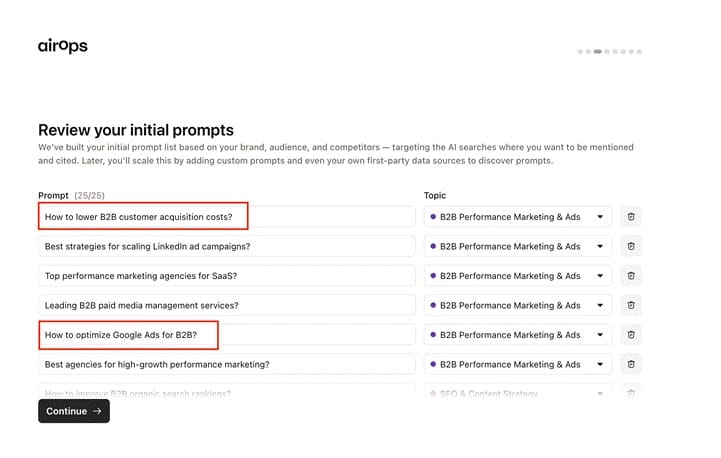
At onboarding, though, the starting list came from the brand, audience and competitor details I entered. I set it up for a partner marketing agency.
In the list below, "How to lower B2B customer acquisition costs?" and "How to optimize Google Ads for B2B?" are both questions that would never lead an AI to name a vendor so they pull your visibility score down without telling you whether AI recommends you.
How Chosenly tracks AI visibility
Chosenly tracks the category (like “HR software” or IT agency) and each criterion buyers attach to it (GDPR, works with Workday, team size) separately. One question with four criteria covers all 16 ways a buyer could ask it. You see which criteria AI recommends you for and which ones send buyers to a competitor.
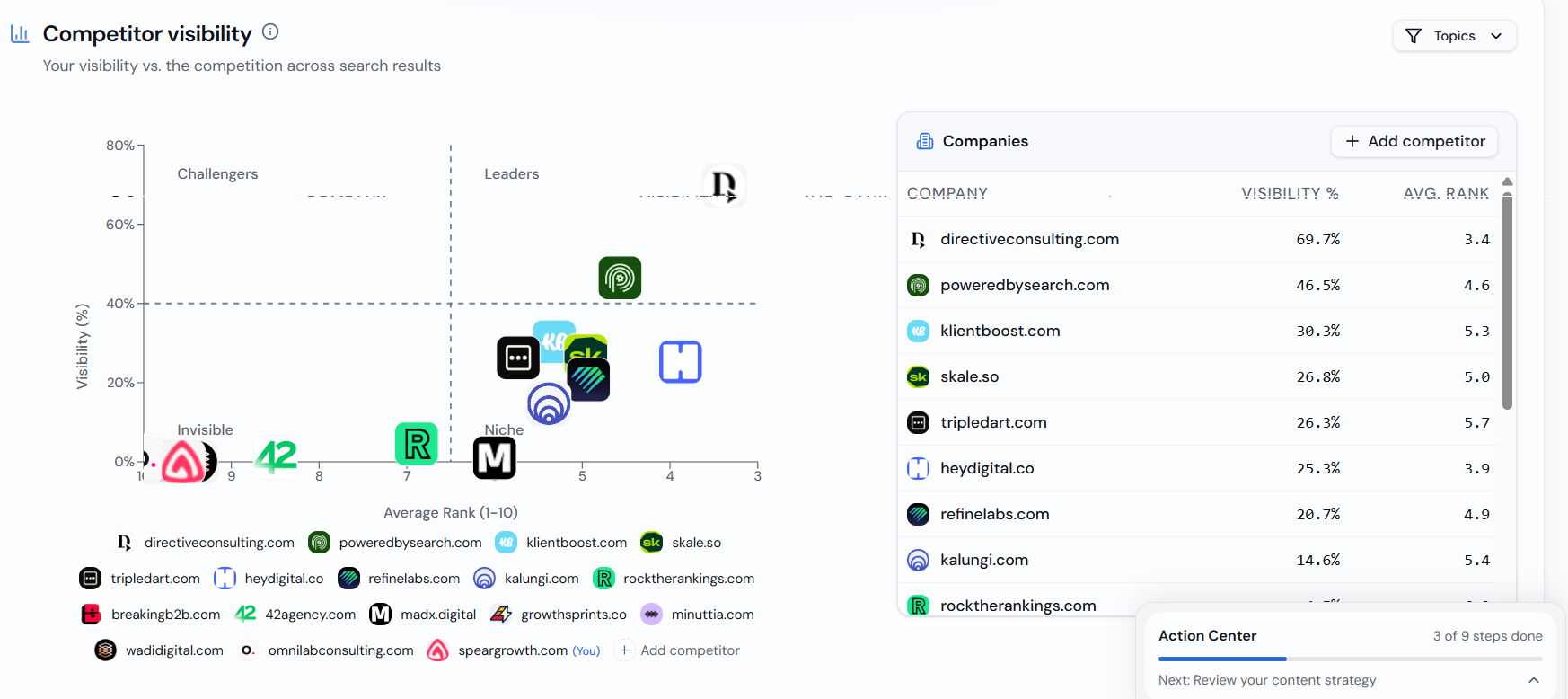
Then there’s the competitor map, which is where most people stare the longest.
Every company in your space gets plotted by two things: how often AI mentions it, and how high it ranks when it does. That splits everyone into four corners: leaders, challengers, niche players and the invisible ones.
Next to the map, a table lists each company’s visibility and average rank.
Spot a competitor you’re not tracking yet? Add it in a click. Want the picture for one topic only? Filter the map by topic.
Where AirOps is ahead: it tracks more AI engines on Pro, including Perplexity and Google AI Overviews.
Where Chosenly is ahead: it tracks the criteria inside each question, filters out prompts no vendor can win, and lets you pick regions and personas on every plan.
2. Content: AirOps writes hundreds of pages, Chosenly writes tens of pages with your experts’ input
Both tools do content at scale. You add brand guidelines and a knowledge base, there’s an editor built in, and both publish to your CMS. Either one beats writing every page manually. The difference is where each one starts.
How AirOps creates content
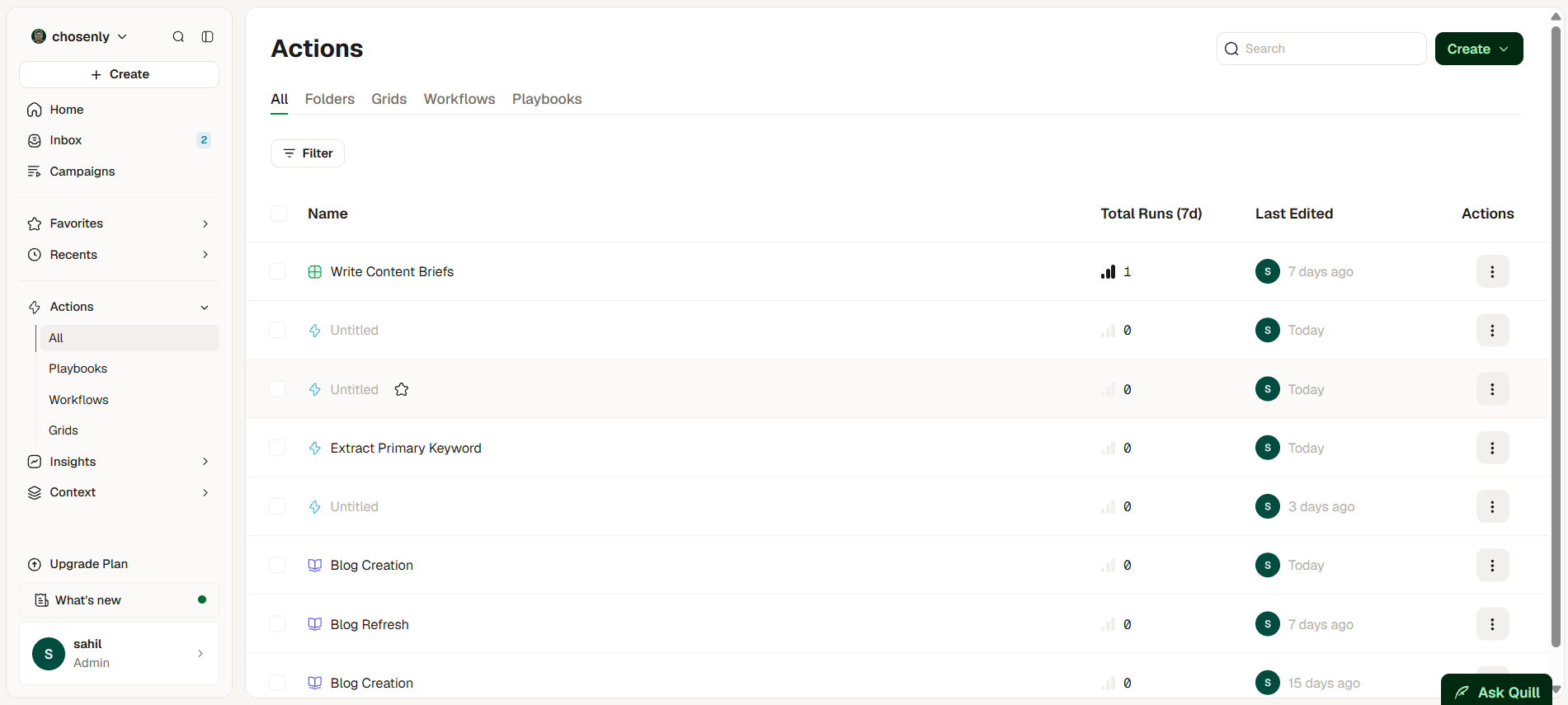
All of AirOps's content work lives in one place called Actions. Open it, and your Grids, Workflows and Playbooks sit together in one list.
You can see what each one is called, how often it ran in the last week and who touched it last.
Before anything runs, AirOps needs context. That's your Brand Kit, with your voice, writing rules, audiences and products. And your Knowledge Bases, with product docs and approved messaging. Everything else reads from those two.
messaging. Everything else reads from those two.
Then you pick how hands-on you want to be.
Workflows
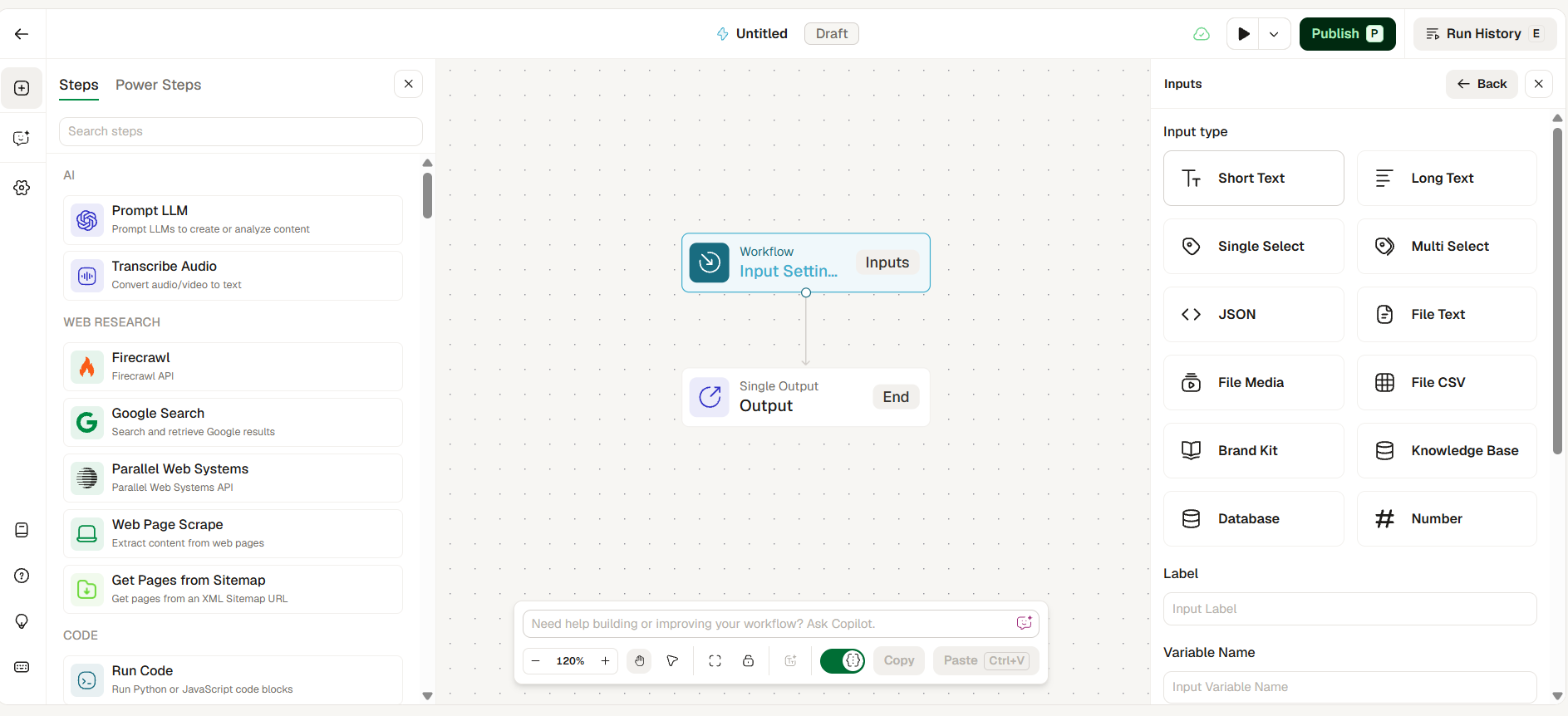
This is the build-it-yourself option. You open a blank canvas with two boxes: what goes in at the top, and what comes out at the bottom. Everything in between is up to you.
The left side is your toolbox. You can ask an AI model to write something, turn audio into text, search Google or scrape a web page. You can even pull every page from a sitemap or run your own code (if someone on your team speaks Python).
The right side is where you decide what the workflow starts with. That could be a short line of text, a CSV file, your Brand Kit or a Knowledge Base.
Want a human to check things before they go further? Add a review step, and the workflow waits for a thumbs up.
If you've used n8n or Zapier, you'll feel at home. If you haven't, there's a Copilot box at the bottom that can build the workflow for you. It'll also help when a step breaks.
Grids
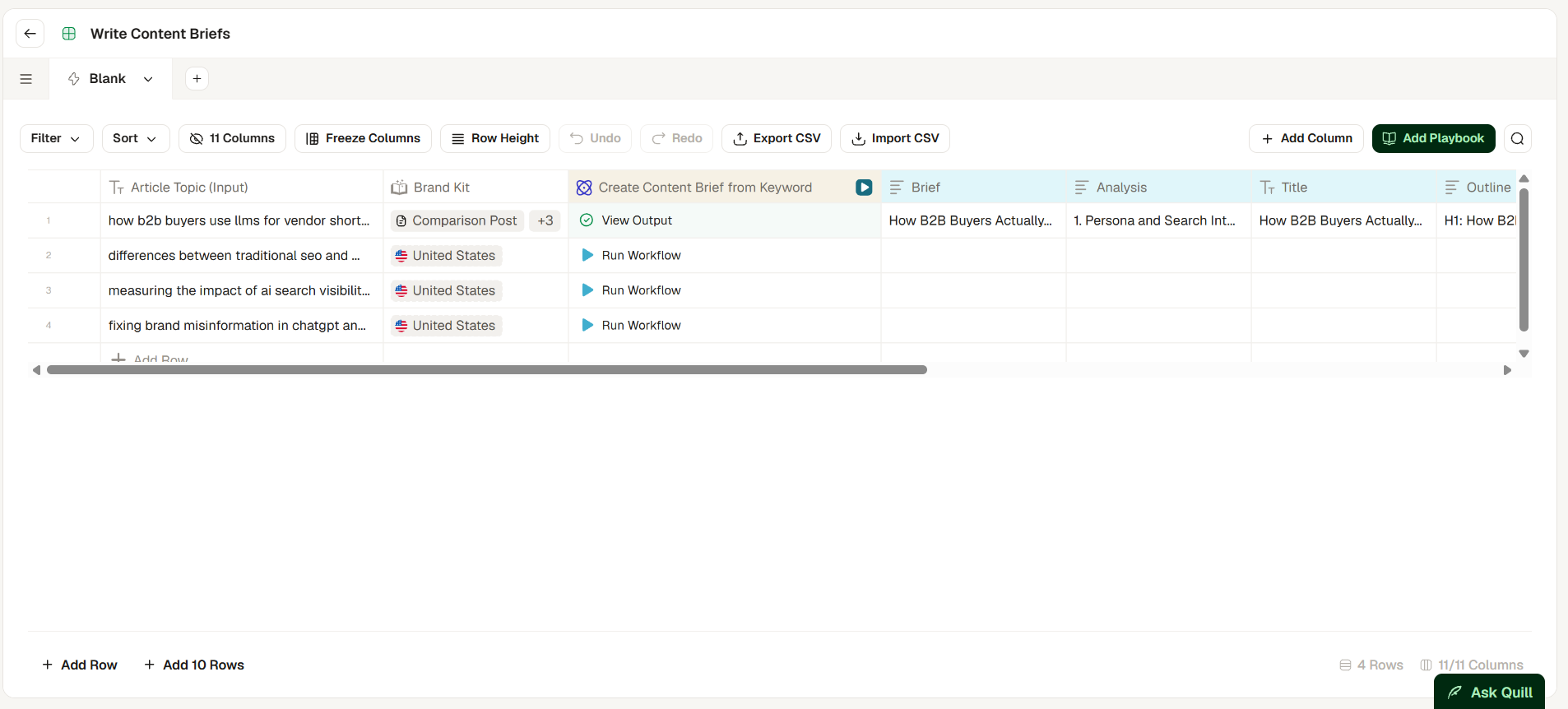
This is where the volume comes from. A Grid looks like a spreadsheet, and each row is one piece of content.
You add your topics in the first column, or import a whole list from a CSV. Then you add a column that runs a workflow, like "Create Content Brief from Keyword."
Hit run, and it works through every row. The results spread out across the next columns: the brief, the analysis, a title and an outline, all in one place.
Need more? Add 10 rows at a time, or add a Playbook column and let Quill take a pass.
Once you're happy with a draft, you can publish it straight to WordPress or Webflow without copy-pasting a thing
Playbooks
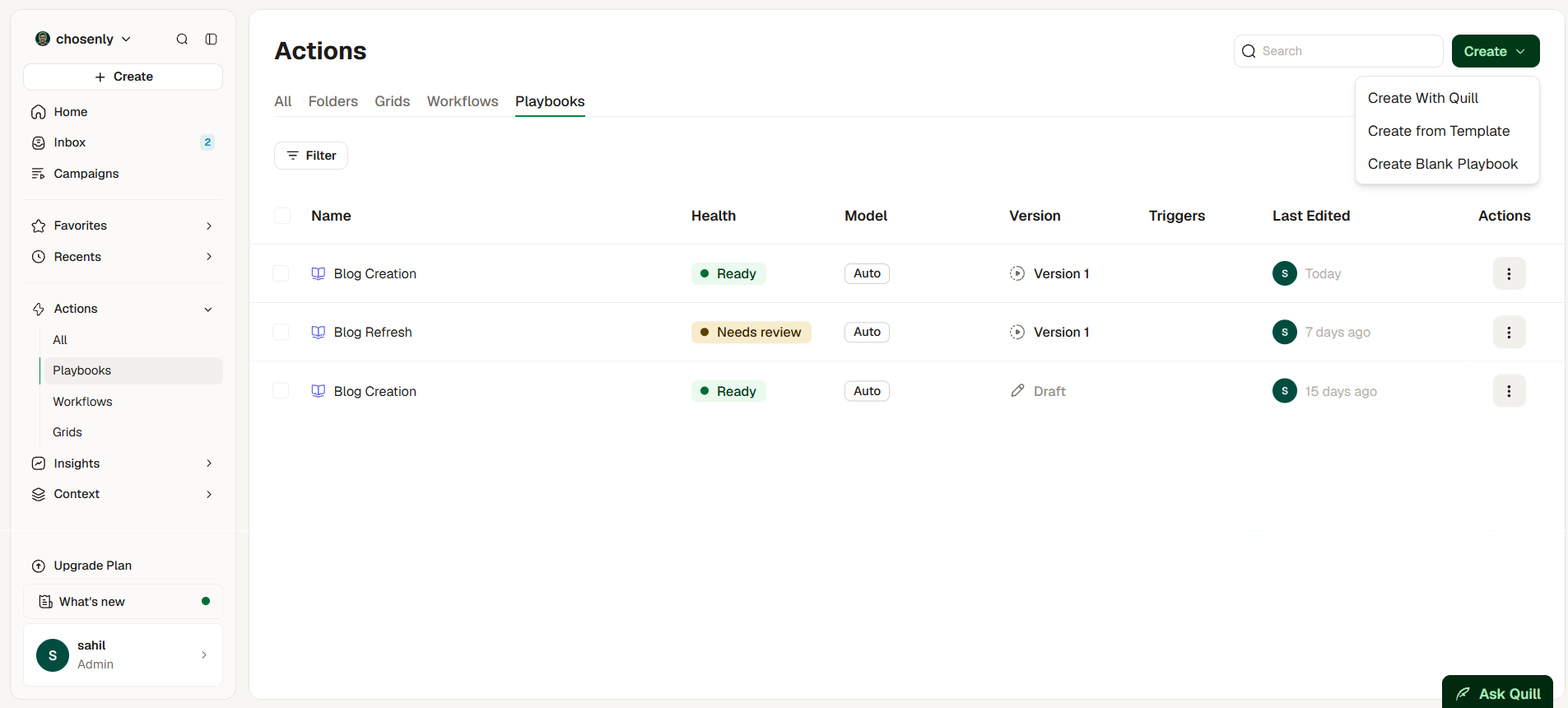
This is AirOps's newer, more hands-off option. A Playbook is basically a brief for an AI agent. You write what you want in plain language, and the agent works out the steps.
You can start three ways. Ask Quill, AirOps's AI agent, to write the Playbook for you, pick a template, or start from a blank page.
Every Playbook has a health label so you know where it stands. "Ready" means it's good to run. "Needs review" means something wants a second look first.
Playbooks have versions too, so you can keep tweaking a draft without breaking the one that already works. You can also set triggers, like a schedule, so a Playbook runs without you pressing the button.
Want a say before anything goes out? Add a review point, and the run waits in your Inbox until you approve it.
Put it all together, and AirOps moves fast. If volume is what you need, it gets the job done.
For deciding what to work on, AirOps ranks your existing pages in its Onsite view using AI citation rates, Google Search Console, GA4 and content freshness. If you have 400 blog posts, it points you at the ones slipping fastest.
The catch is setup. Every one of these runs on your Brand Kit, your Knowledge Bases and the Workflows or Playbooks you build. So AirOps works best when someone on your team can picture all the information AI will need for every page you queue, and add it to AirOps before anything runs. You can’t go back and add information later to improve a page that’s already written, and that gets really hard to pull off at scale.
Workflows need every step spelled out. Playbooks need a clear brief and someone checking what Quill sends back. That's the learning curve G2 reviewers keep mentioning.
One marketer I interviewed for this piece, who ended up not going ahead with AirOps, summed it up: “You basically need a single person who understands RevOps (for the workflows), content (for the writing), product marketing, and SEO to make this successful.”
Publishing pages in bulk without a person reviewing them can also put your domain at risk of getting flagged by Google and other search engines. I’d only run AirOps that way if you really know what you’re doing.
How Chosenly creates content
Take an HR software company. Its content marketer doesn’t always know exactly which Workday data syncs. A product marketer does. So does a solutions engineer, someone in sales or customer success, or a founder. Chosenly gets what those people know into the page, with a lot less setup.
Most of the work is done before you start
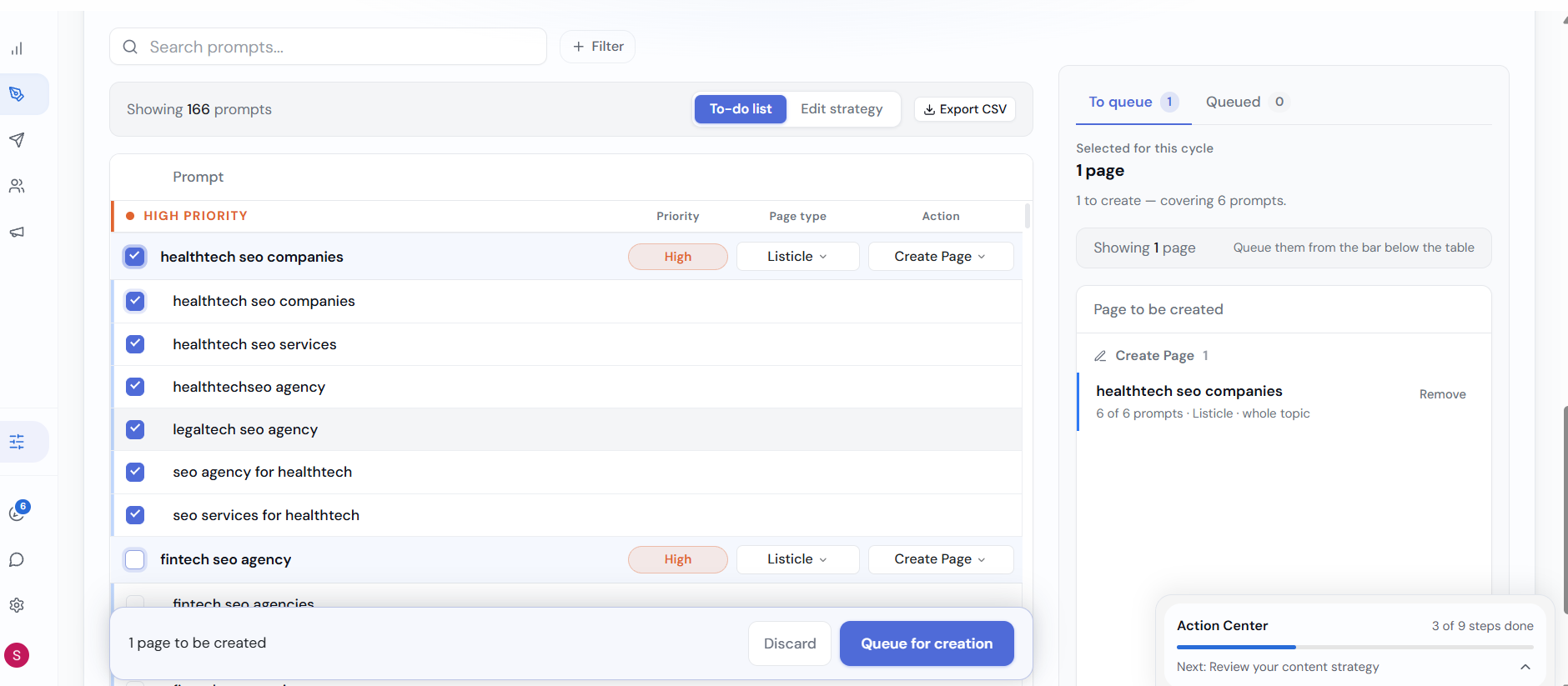
There are no workflows to build. The Content tab opens on a content strategy that’s already done: every topic for this cycle, ranked by priority, with the page it needs (like a top-10 list) and whether to create a new page or refresh an existing one. The keywords and sources come straight from what AI already cites for each topic.
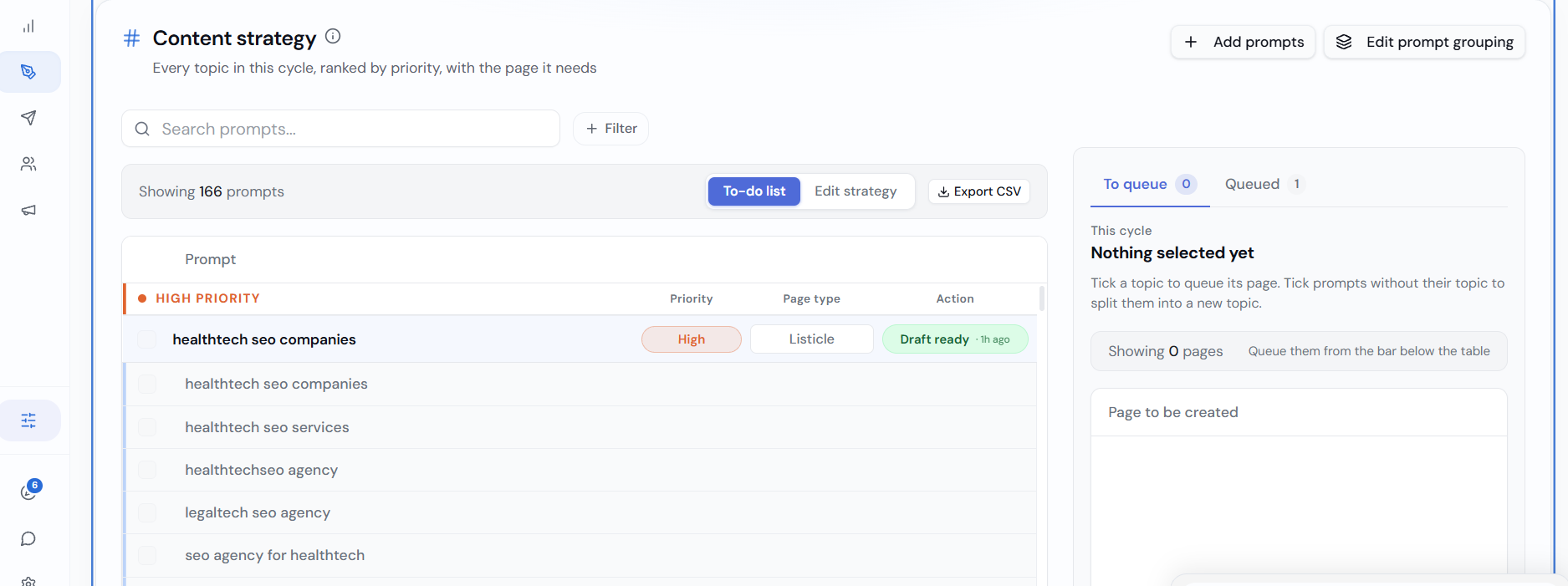
From there, it’s a few clicks. Tick the topics you want, hit “Queue for creation,” then pick the format, the language and a brand voice. You can use a voice you’ve saved, start from a default, or have Chosenly write one from a couple of blogs whose tone you like.
The first version is ready in about 10 minutes, and it goes to your CMS with the internal links already in place.
Every page carries what your team knows
- It asks your experts. When a page needs details the web doesn’t have, Chosenly sends a few questions to the right people on your team. They answer once, and the page is built on what they know.
- It follows your positioning. It writes from your positioning doc first, so if your website says something outdated, the page goes with the positioning doc.
- You can add information any time. Ask the editor to update something like your pricing, and it finds every spot that needs the change and lets you accept or reject each one.
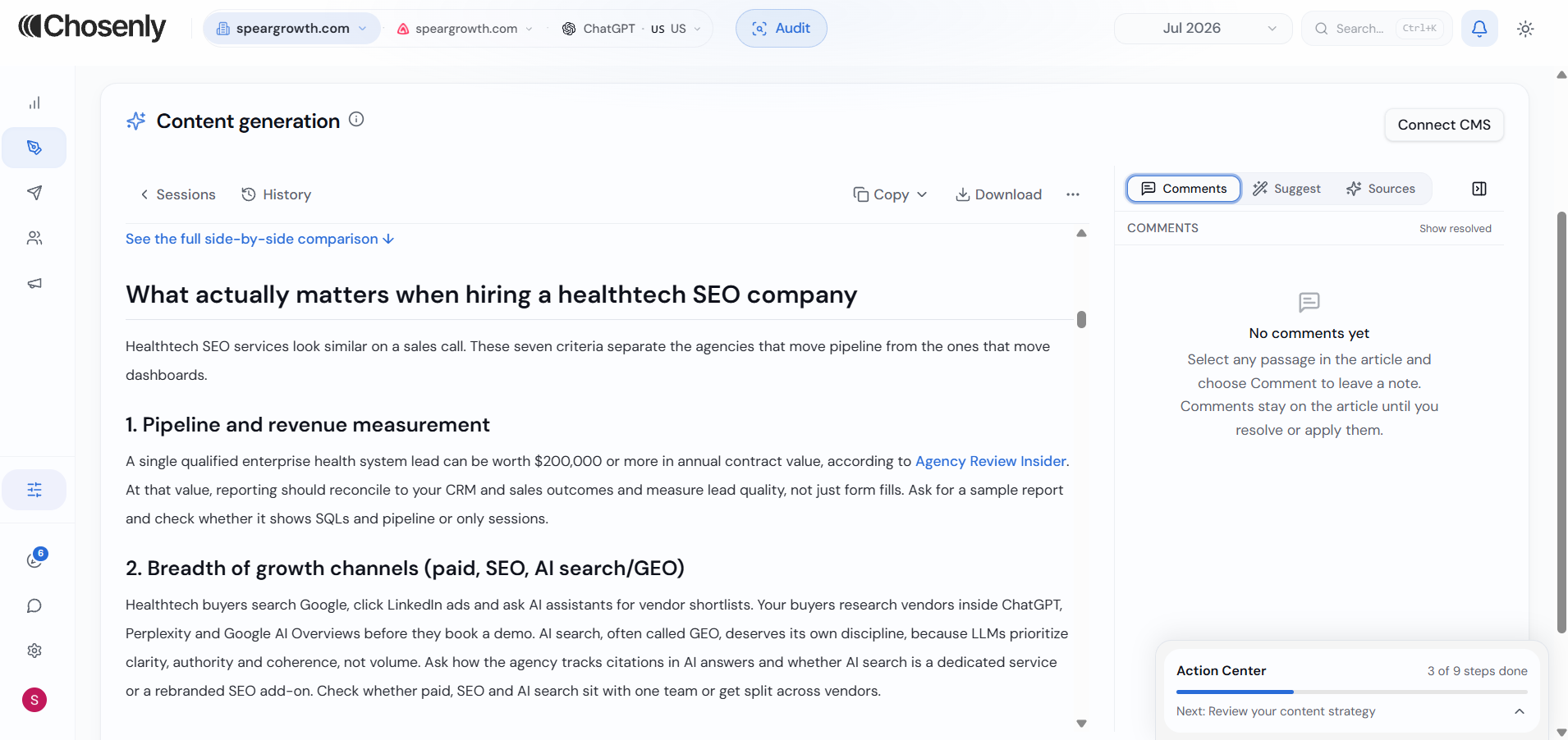
- Every fact shows its source. The editor feels like Google Docs. Comment on any passage, ask for AI edits, see where each fact came from in the Sources tab and go back through every version.
Which tool wins on content
You’ll publish more, faster, with AirOps. If you need hundreds of pages and have someone to build workflows, it’s the stronger choice.
With Chosenly, you’ll publish tens of pages, and each one carries more of your company’s own knowledge, which we believe makes better content for buyers comparing vendors. Sourced sentences also make bottom-of-funnel pages safer to publish, since an invented claim about a competitor is easy to spot before it goes live.
3. Off-site mentions: both tools find the pages AI cites, and Chosenly puts outreach in the app on every plan
A lot of what AI says about you comes from other sites: top-10 lists, review roundups and Reddit threads. Both tools help you show up there.
How AirOps handles off-site mentions
AirOps’s off-site module is called Offsite, and it’s a solid way to see who AI is reading in your category.
The Citations tab lists every page AI cited in your category. For each page, you see:
- whether your brand is mentioned
- how that mention sounds
- which competitors show up
- an influence score for how much the page shapes AI answers.
You can slice it by date, region and AI platform, group pages by URL or domain, and export the whole list. Social and Community tabs sit next to Citations, so the same view covers more than just blogs.
The quickest win is filtering for pages that mention your competitors and not you. That’s your outreach list, sorted by influence.
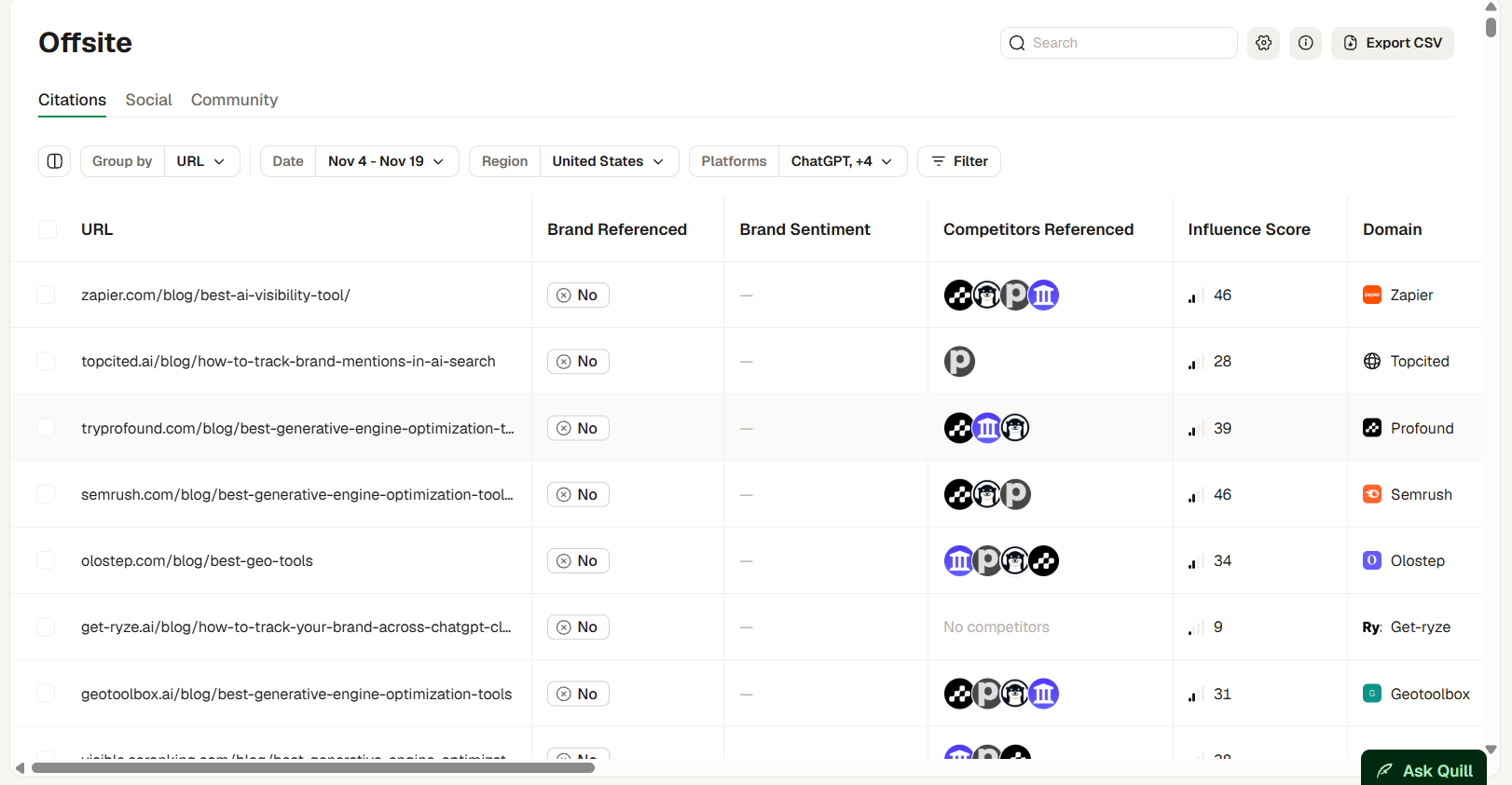
On the plan I tested, Offsite showed the cited pages and a “Talk to our team” button, so getting placed meant speaking to AirOps.
How Chosenly handles off-site mentions
Chosenly’s Outreach page starts with the big picture: how many pages AI cited in your category, how many mention you and how many mention your competitors instead.
Next to it, a share-of-voice chart shows how often each brand gets mentioned across those pages. Hover over any company to see its mentions, share and rank.
There’s also a list of the websites AI cites most, ranked by how many buyer searches surfaced them. That’s where you’d want to be seen first.
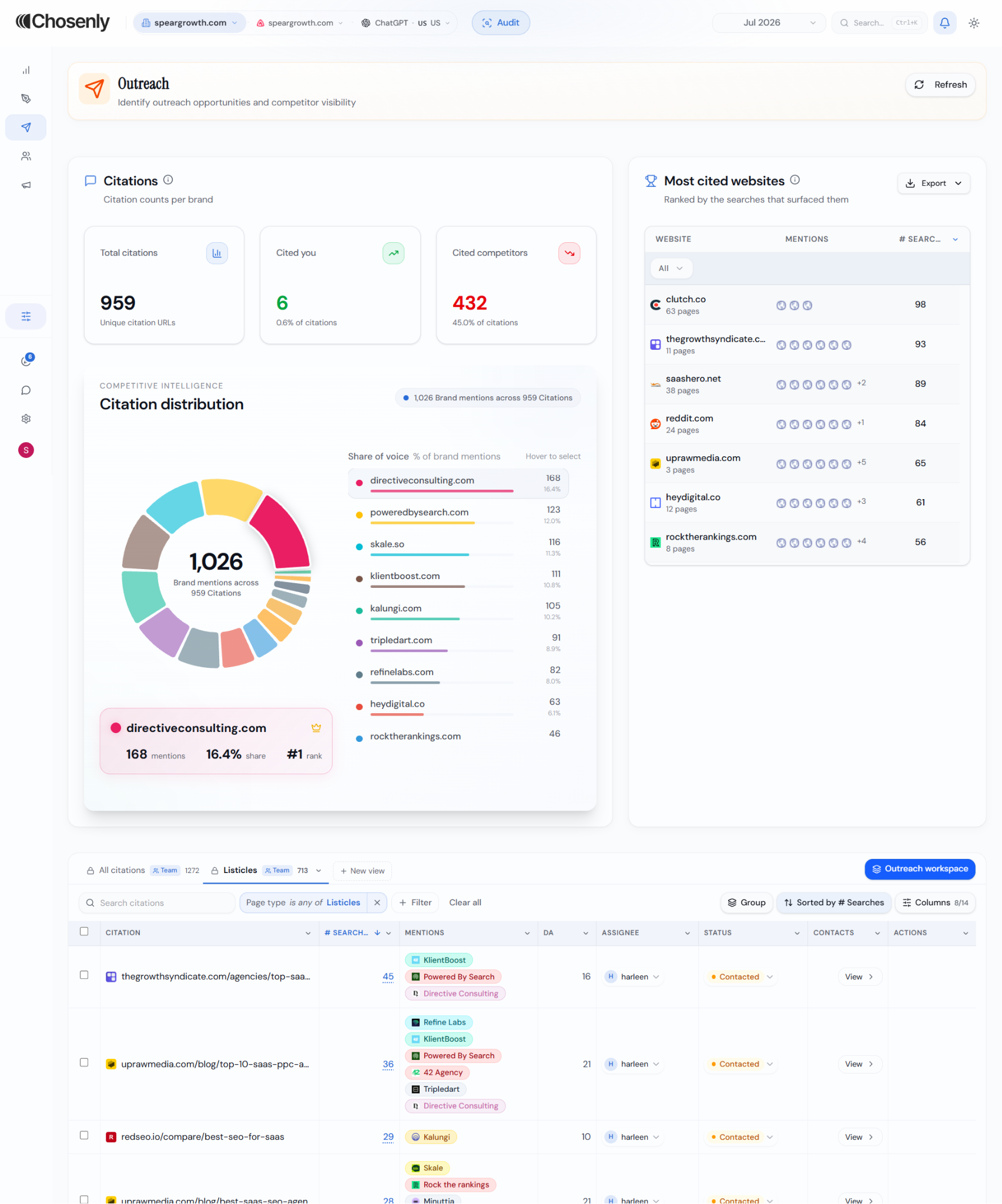
Below that sits every page AI cited, grouped by type: top-10 lists, blogs, review and directory sites, community threads, news and more. Home pages and landing pages get their own groups, so you can skip the ones you can’t pitch.
Most of the action is in the top-10 lists, so there’s a saved view just for them, and the whole team sees it. Each list shows how many buyer searches it appears in, its domain authority and every brand it mentions. Pages that name three competitors and not you are a pretty clear place to start.
Pick a list, assign it to a teammate and track where the outreach stands. If Chosenly already has the contacts, hit View. If not, hit Search and it finds them.
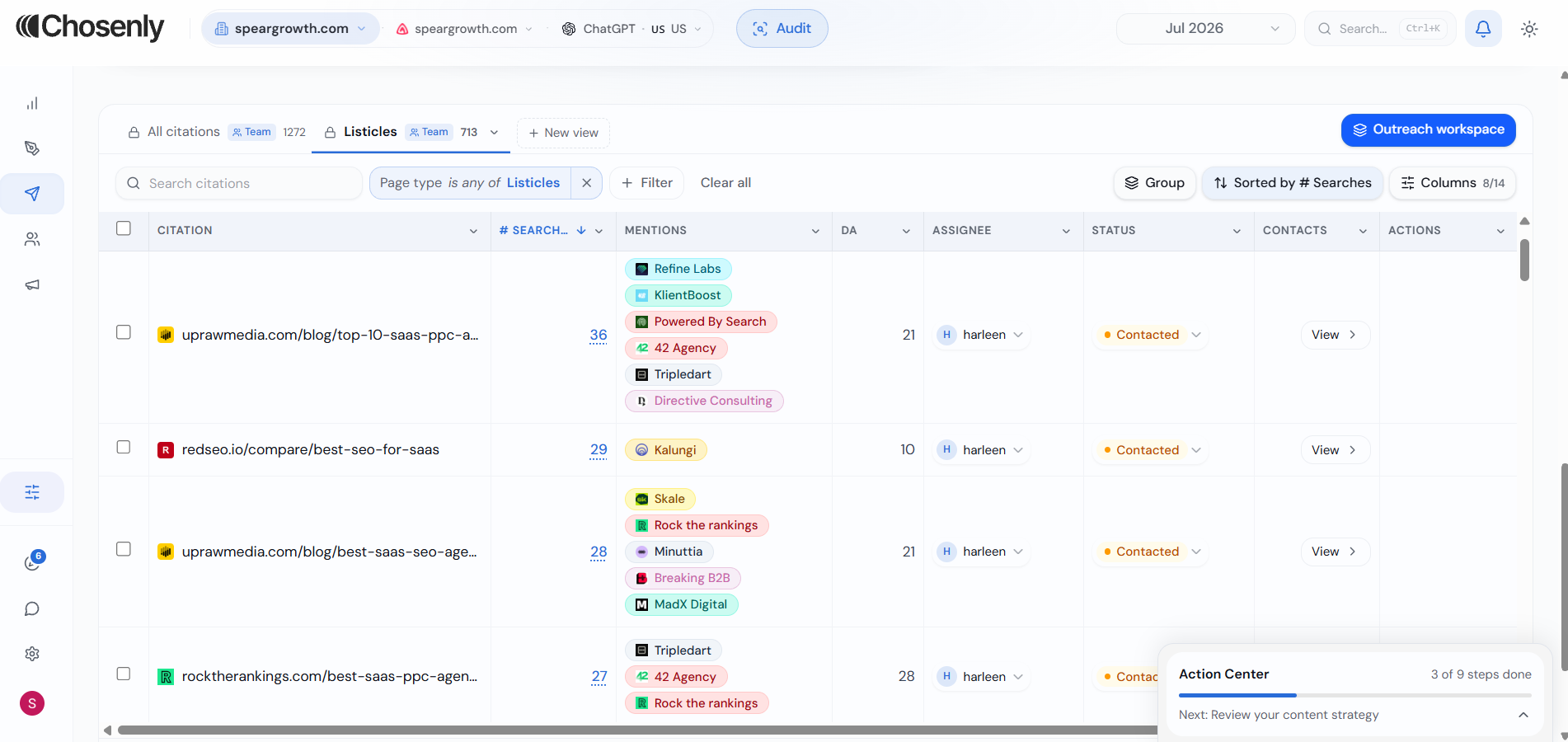
From there, you have three options:
- Outreach agent: finds the name, email and LinkedIn of the people who run each site and drafts the pitch. Your team reviews and sends it.
- Marketplace: buy placements on 500,000 B2B sites AI cites, with deals already in place, inside Chosenly.
- Done for you: our team pitches, negotiates and gets you placed.
Where AirOps is ahead: more channels, including influencers and ads.
Where Chosenly is ahead: placement automation lets you find contacts and send pitches yourself on every plan, and the marketplace gets you placed faster.
4. Help: both have a services team, and Chosenly includes a GEO expert on every plan
If your marketing team is two or three people, nobody has time to build and babysit workflows. So it’s worth knowing how much help comes with the plan itself, before services enter the chat.
AirOps: Solo and Pro come with community and live chat support. A dedicated account manager, training and one-on-one onboarding come with Enterprise. AirOps also sells services if you want its team to do the work, and the customer we spoke to called its support team the main reason they stayed.
Chosenly: every plan comes with our Human support team. You get a GEO expert you can reach through a shared Slack channel or email, plus fortnightly calls to go over what’s working.
They’re there for the stuff that’s hard to google. A few examples of what people ask:
- “Does this draft look good? What would you change?” They’ll read it and add their suggestions.
- “Is this outreach template any good?” They’ll tell you, and share a couple they’ve seen work for other clients.
- “Which of these topics should we go after first?” They’ll walk you through the strategy with your own data open.
They make sure you’re never stuck on your own, which matters a lot more when your team is small.
Want someone to take the work off your plate? That’s what Done for you is for: expert interviews, writing and publishing, a positioning workshop and weekly strategy calls.
If you’d rather not learn a workflow builder, this is the biggest practical difference. With Chosenly, someone who knows your account is a message away from day one.
AirOps pricing: Solo starts at $200 a month, and the real cost depends on tasks and seats
AirOps doesn’t publish prices on its website, so this part is a bit of a treasure hunt. When I signed up in November 2026, the plan picker inside the app showed the following.
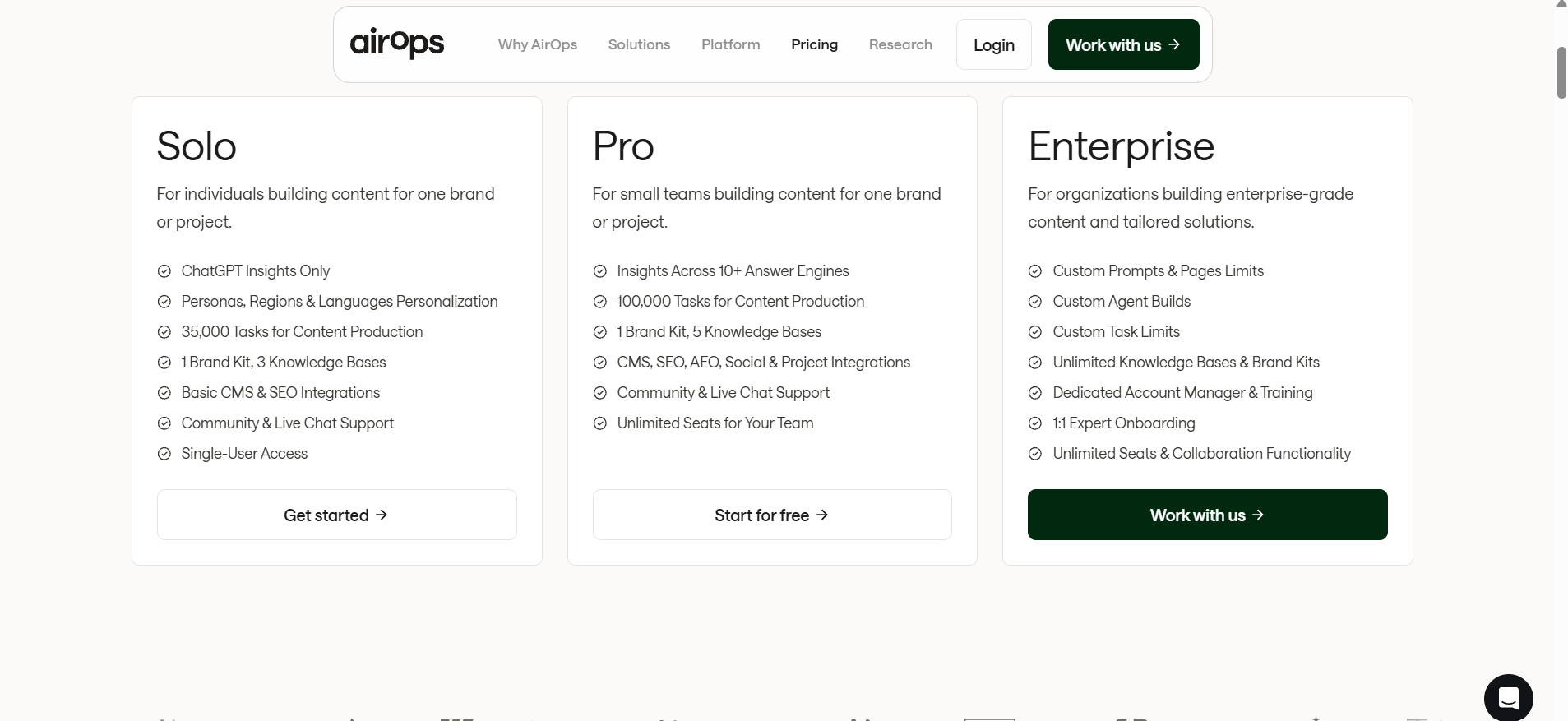
| Plan | Price | What’s included |
|---|---|---|
| Solo | $200/month | ChatGPT only, 35,000 tasks, 1 brand kit, 3 knowledge bases, community and live chat support, one user |
| Pro | Custom | Multiple AI engines, 100,000 tasks, 5 knowledge bases, community and live chat support, unlimited seats |
| Enterprise | Custom | Custom limits, multi-region and multi-persona tracking, ChatGPT ads, dedicated account manager, one-on-one onboarding |
wo things to plan for:
- Tasks. AirOps bills by tasks, and every step a workflow runs uses them. On Solo, each extra task costs $0.025. A big refresh can eat through a month’s tasks quickly, which is why reviewers say the cost of actions is hard to predict. Run a small batch first and see how many tasks it uses.
- Seats, engines and time. Solo is one user and ChatGPT only, so adding your team or a second AI engine means Pro, which is priced on a sales call. Budget for the hours someone spends building and maintaining workflows too.
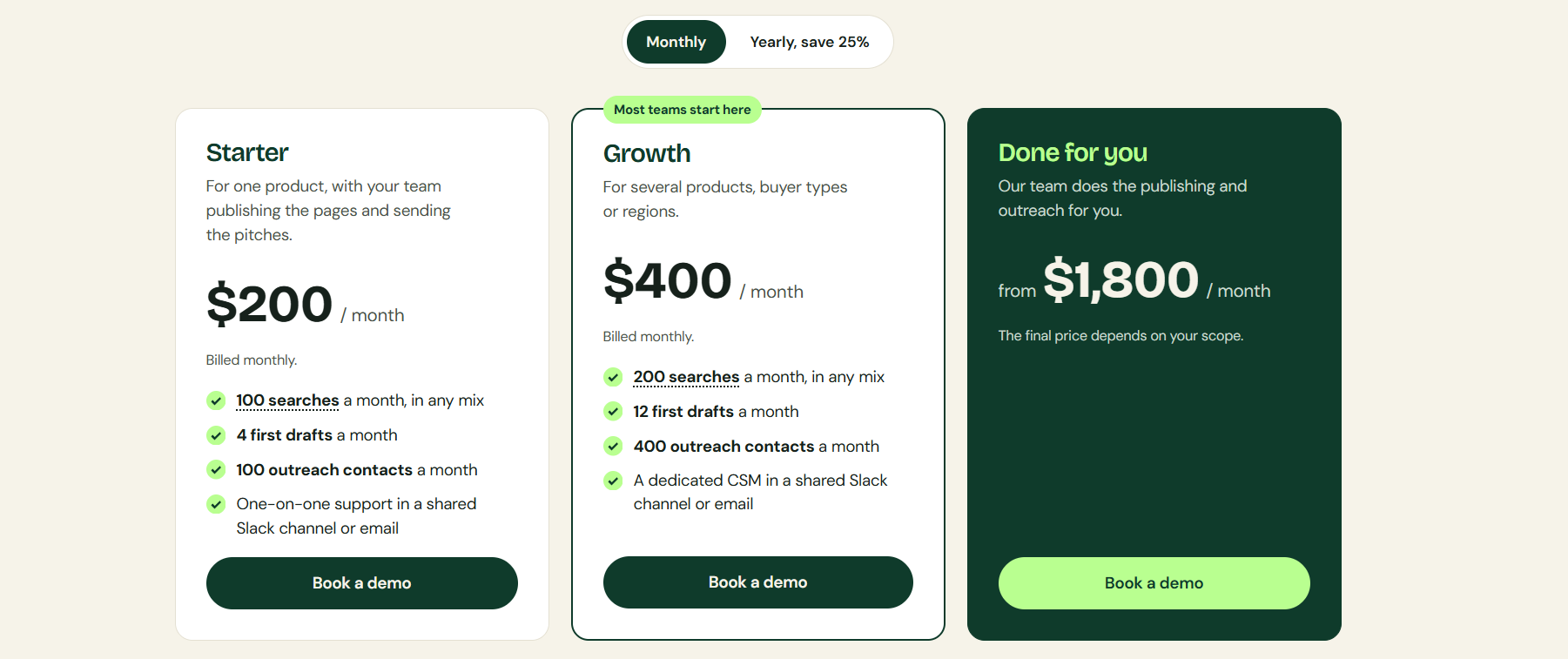
Chosenly pricing: Starter at $200 a month, Growth at $400
Chosenly’s prices are public, billed monthly, and you can cancel any time.
| Plan | Price | What’s included |
|---|---|---|
| Starter | $200/month | 100 searches, 4 first drafts and 100 outreach contacts a month |
| Growth | $400/month | 200 searches, 12 first drafts and 400 outreach contacts a month, a dedicated CSM |
| Done for you | $1,800/month | Our team writes, publishes and gets you placed |
A search is one buyer question, on one AI engine, in one region, and it covers every version of that question a buyer could type. Every plan includes unlimited seats, ChatGPT, Gemini and Claude, and a GEO expert through a shared Slack channel or email.
Three tests show the difference before you commit
AirOps has a free trial, and we’ll run a live demo on your own brand. Three steps are enough.
- Give each tool a real buyer question. Use one your sales team actually hears, with the criteria left in, like “GDPR compliant, works with Workday and suits 150 people.” See whether the tool reports on that exact question or only on a shorter version of it. Your buyers don’t ask the short version.
- Ask each tool what to do next. Pick one gap it shows you and see whether you get a specific page, site or contact to act on, or a score. A score alone doesn’t change what AI says about you.
- Time the setup. Note the hours from sign-up to your first useful output, and who on your team had to be involved. The plan price is only part of what a tool costs you.
Verdict: AirOps for volume, Chosenly for getting B2B buyers to pick you
AirOps is a strong platform if your bottleneck is content volume and you have someone to run workflows. It will help you publish hundreds of pages fast.
If you sell B2B, the bottleneck is usually different. Your buyers ask AI detailed questions, and you lose the recommendation on one or two specific criteria. Chosenly shows you which ones, creates and refreshes the pages that fix them with your team’s knowledge, gets you onto the lists AI cites, and gives you a GEO expert to help you prioritize. For that, Chosenly is the better choice.
Find the row that sounds most like you.
| If this sounds like you | Pick |
|---|---|
| You need hundreds of pages a month and have someone to build workflows | AirOps |
| You sell to consumers, or your buyers ask AI short, simple questions | AirOps |
| You want influencer work or ChatGPT ads in the same tool | AirOps |
| Your buyers compare vendors on integrations, compliance, budget or region | Chosenly |
| You want your product, sales and solutions people’s knowledge in every page | Chosenly |
| You’re a small team and want a GEO expert who knows your account | Chosenly |
See how Chosenly compares with AirOps on your own category
If you're weighing AirOps for AEO or GEO, the quickest way to compare is to see your own category in Chosenly. Book a demo and we'll run your category and its criteria through Chosenly live. You'll see what ChatGPT recommends to your buyers, which criteria you're losing on, and what we'd fix first.
Book a Chosenly demo →FAQs
How much does AirOps cost?
AirOps doesn’t publish prices. In November 2026, the plan picker inside the app showed Solo at $200 a month, with Pro and Enterprise priced on a sales call. Solo includes 35,000 tasks, one user and ChatGPT tracking only.
Is AirOps good?
Yes, for the right team. It has 4.7 out of 5 on G2 from 135 reviews, and users praise its workflows, Quill and support. The most common complaints are the learning curve and how hard it is to predict task usage.
Which AI engines does AirOps track?
AirOps names ChatGPT, Gemini, Perplexity, Google AI Mode and Google AI Overviews. Solo covers ChatGPT only, and the other engines need Pro.
What is AirOps Offsite?
Offsite is AirOps’s module for getting mentioned on the third-party sites AI cites. It lists the cited pages and their influence, and AirOps offers it as self-serve workflows or a fully managed service where its team runs the outreach.
What’s the best AirOps alternative for B2B companies?
Chosenly, if your buyers ask AI detailed questions and you’d rather publish fewer pages built on your team’s knowledge. It tracks the category and each buying criterion, creates and refreshes pages with every sentence sourced, finds the contacts behind the lists AI cites, and includes a GEO expert on every plan.
I’m already on AirOps. What would change with Chosenly?
You’d see which buying criteria cost you the recommendation, alongside how often you’re mentioned. Your pages would start from your experts’ answers, you could run outreach from the app, and you’d have a GEO expert from day one, on any plan.
Is Chosenly a good fit for B2C brands?
Not today. Chosenly is built for B2B buying journeys. If your buyers ask AI short, simple questions, a prompt tracker like AirOps covers them well.